+91 9893014167
  1 (888) 316-3286
 +44 20 3807 2189
 Chat on WhatsApp


Last updated: 11 October 2026
Traffic drops by a third and the first thought is a Google penalty. Usually it is something far smaller. A plugin update has added a noindex tag to every service page, or a redesign has dropped the old URLs, and nobody has opened Search Console in months to notice.
That is what most SEO damage looks like now. Not a dramatic algorithm hit, but small execution mistakes: pages Google can’t index, reports that measure the wrong thing, content that misses what the searcher wanted, and AI search left to chance. Each one is fixable, and most are cheap to fix once you know where to look.
Key Facts
- Google’s AI features documentation says a page must be indexed and eligible to show with a snippet to appear as a supporting link in AI Overviews or AI Mode, with no additional technical requirements.
- Google’s documentation says AI Overviews and AI Mode traffic is reported inside the Search Console Performance report under the Web search type, not as a separate report.
- Pew Research Center reported in July 2025 that users clicked a traditional result on 8% of Google visits with an AI summary, against 15% without one, from 68,879 searches by 900 US adults.
- Ahrefs reported in February 2026 that an AI Overview correlated with a 58% lower average clickthrough rate for the top-ranking page, across 300,000 keywords using December 2025 data.
- OpenAI’s crawler documentation says sites that block OAI-SearchBot will not be shown in ChatGPT search answers, though they can still appear as navigational links.
- Microsoft introduced an AI Performance report in Bing Webmaster Tools on 10 February 2026, showing how often a site is cited in Copilot and Bing’s AI-generated summaries.
- Google’s site move guidance says to keep redirects for as long as possible, generally at least one year.
This article covers the execution mistakes we find most often when we look at a site that has stalled: indexing, crawler access for AI search, measurement in Search Console and GA4, content that misses intent, migrations and internal linking. For each one: how to spot it, and what to do.
Are Your Most Important Pages Actually Indexed?
Check before you assume. Open the Page indexing report in Search Console and look at your service, product and category pages one by one. Stray noindex tags, canonicals pointing to the wrong URL and pages blocked in robots.txt after a staging launch are the usual suspects.
This matters more now because it also decides AI visibility. Google’s documentation on AI features in Search says a page must be indexed and eligible to show with a snippet to appear as a supporting link in AI Overviews or AI Mode. It also says there are no additional technical requirements. So a page Google won’t index can’t be cited there either.
Look at the excluded pages as well as the indexed ones. “Crawled, currently not indexed” on a key page usually means Google saw it and didn’t think it was worth keeping, which is a content problem rather than a technical one. “Discovered, currently not indexed” on hundreds of URLs often points to faceted navigation or tag pages wasting crawl attention.
Watch for nosnippet and max-snippet settings too. We have seen sites add them to protect content, then wonder why they vanished from AI answers.
Are You Hiding From ChatGPT And Copilot Without Realising?
Quite possibly. Many sites blocked every AI crawler in 2023 out of caution, and that blanket rule is still sitting in robots.txt. Some security and CDN settings now block AI bots by default as well.
The detail matters. OpenAI’s crawler documentation separates OAI-SearchBot, used for ChatGPT search, from GPTBot, used for model training. Sites that block OAI-SearchBot “will not be shown in ChatGPT search answers” though they can still appear as navigational links. You can allow one and block the other. Copilot draws on Bing’s index, so if Bingbot is blocked or your site isn’t verified in Bing Webmaster Tools, you are working blind there too.
Decide on purpose. Blocking training while allowing search is a reasonable position for many businesses. Blocking everything by accident is not.
Are You Still Reporting Rankings While Clicks Quietly Fall?
This is the measurement mistake we see most. A report shows stable positions, but enquiries are down, because fewer people click even when you rank.
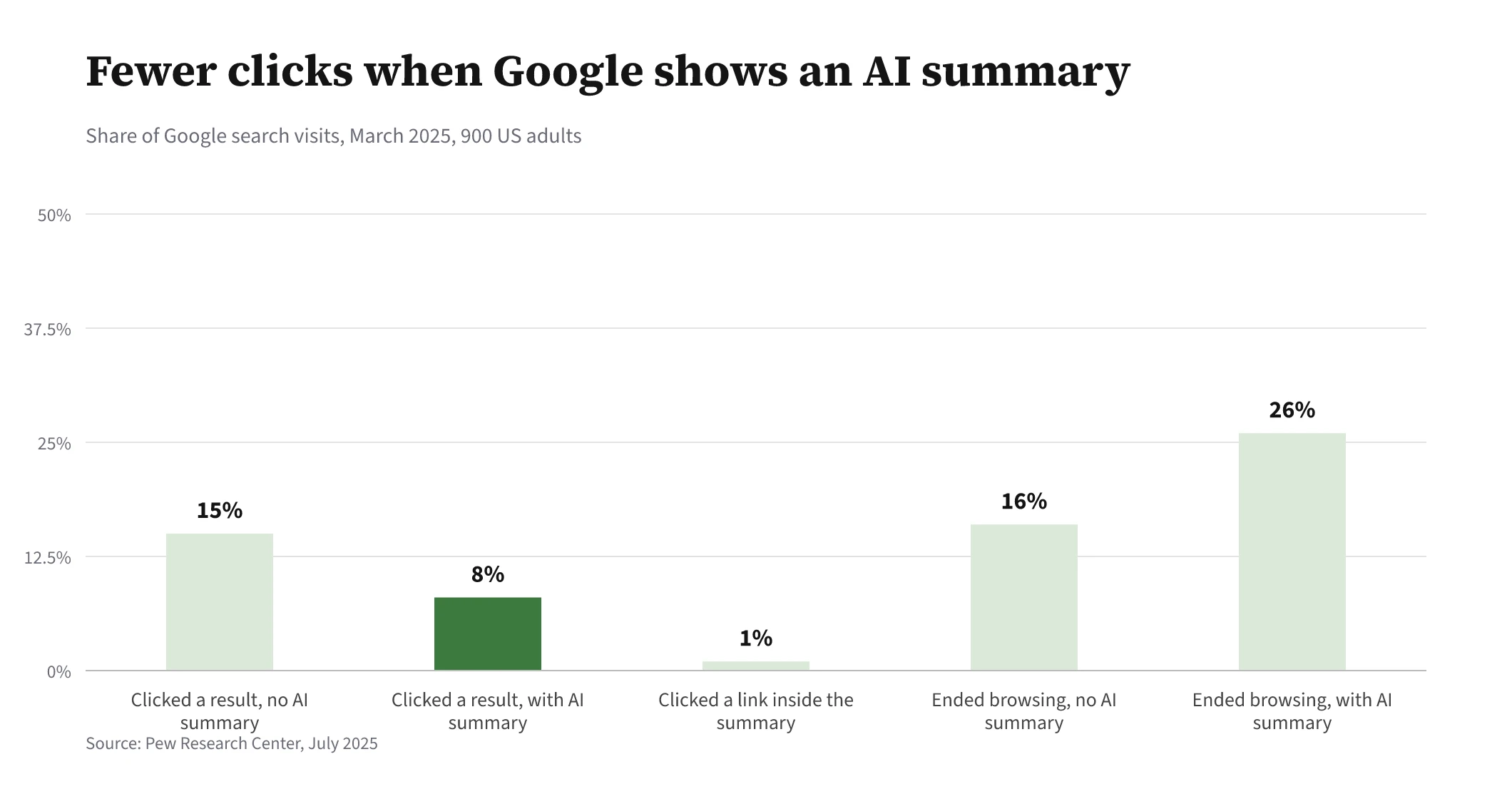
The data on this is fairly consistent. Pew Research Center found that people clicked a traditional result on 8% of Google visits that showed an AI summary, against 15% when there was none, and clicked a link inside the summary on just 1%. Ahrefs’ February 2026 study of 300,000 keywords found an AI Overview correlated with a 58% lower clickthrough rate for the top result. That is correlation on desktop data, so treat the exact figure with care. The direction is not in doubt.
We cover the causes in more detail in why rankings hold but clicks keep falling. The fix is to report impressions, clicks and leads side by side, not positions alone.
Can You Trust What Search Console And GA4 Are Telling You?
Only if both are set up to answer a business question. In Search Console, AI Overviews and AI Mode traffic is not split out. Google says it is counted inside the Performance report under the Web search type. So a fall in clickthrough rate on a page with steady impressions is often the AI layer, not a ranking problem.
In GA4 the common faults are simpler. Form submissions and phone clicks not marked as key events. Thank-you pages counted twice. Referral traffic from ChatGPT, Perplexity and Copilot lumped into general referrals, where nobody looks. A custom channel group for AI assistants takes ten minutes and makes that traffic visible.
For citations, Microsoft added an AI Performance report to Bing Webmaster Tools in February 2026, showing how often your pages are cited in Copilot and Bing’s AI summaries. It doesn’t show clicks, but it is first-party data and it is free. Our piece on measuring AI visibility covers the rest. If your tracking itself is broken, our analytics and tracking service starts there.
Does Your Page Answer The Question The Searcher Actually Asked?
Often it doesn’t, and this is the most underrated mistake on the list. A person searching “how much does a loft conversion cost” wants a range, what changes the price and an example. A sales page with a contact form does not answer that, however well optimised it is.
Look at what already ranks for the query. If the top results are guides and your page is a service page, or the reverse, you have an intent mismatch. No amount of links fixes that.
Length is not the answer either. Google’s guidance on helpful, people-first content asks whether you are writing to a word count because you heard Google prefers one, and answers its own question: “No, we don’t.” Put the direct answer near the top, then the detail. That structure suits readers, and it is also easy for AI answers to quote.
Did Your Last Redesign Or Migration Quietly Cost You Traffic?
Migrations are where we see the biggest single losses. A new design launches, old URLs return 404s or all redirect to the home page, and months of rankings disappear with them.
Google’s site move guidance is clear on the essentials. Map every old URL to its closest new equivalent with a permanent redirect. Keep the redirects “for as long as possible, generally at least 1 year.” Expect ranking fluctuations, and for a medium-sized site allow a few weeks or more for Google to start showing the new URLs.
The mistakes are nearly always the same: no URL map, a staging noindex left in place, internal links still pointing at old URLs, and redirects removed after a hosting change. Our website migration checkpoints list what to check before and after launch.
Can Google Follow Your Internal Links To Every Page That Matters?
Not always. Google says it can generally only crawl a link if it is an HTML anchor element with an href attribute. Menus and buttons built with JavaScript click events, without a real link underneath, can leave whole sections of a site hard to find.
Google’s link best practices also say every page you care about should have a link from at least one other page on your site. Orphaned pages, reachable only through the sitemap, tend to rank poorly and get crawled rarely.
The fix is plain. Link from your strongest pages to the ones you want to rank, use descriptive anchor text instead of “click here” and link between related articles and the service they support. Our guide to site structure and internal linking goes further.
| Mistake | How to spot it | What to do |
|---|---|---|
| Key pages not indexed | Search Console Page indexing report | Remove stray noindex, fix canonicals and robots.txt |
| AI search crawlers blocked by accident | Read robots.txt and CDN bot settings | Allow OAI-SearchBot and Bingbot if you want to be cited |
| Reporting positions only | Stable rankings, falling clicks and leads | Report impressions, clicks and leads together |
| Broken GA4 key events | Leads in the inbox but not in GA4 | Mark forms and calls as key events, add an AI channel group |
| Content misses intent | Top results are a different page type | Match the format, answer first, then detail |
| Migration without a URL map | Spike in 404s after launch | One-to-one 301 redirects kept for at least a year |
| Orphaned or JavaScript-only links | Pages with no internal links in a crawl | Real anchor links from strong, related pages |
Start with the cheapest checks. Open the Page indexing report, read your robots.txt, and confirm your key events in GA4 are firing. Those three take an hour and catch most of what we find.
Then look at the bigger items: intent, internal links and any migration in the past year. At SEOValley we usually find that fixing what is already broken does more than any new campaign. If you want a second pair of eyes on the site itself, our technical SEO service is where that work begins.
About The Author
Shabir MS leads SEOValley Solutions and has worked in search since 2005. These days most of his time goes on how brands show up in AI answers, and on separating what the data actually shows from what gets said at conferences. Read more from Shabir MS.
Frequently Asked Questions
Do I need special markup to appear in AI Overviews?
No. Google says there are no additional technical requirements beyond being indexed and eligible to show with a snippet. Clear structure and direct answers help readers and make content easier to quote.
How do I see AI Overview traffic in Search Console?
You can’t isolate it. Google counts AI Overviews and AI Mode within the Web search type in the Performance report, so watch clickthrough rate trends on pages with steady impressions.
Should I block GPTBot?
That is a business decision about model training. Blocking GPTBot does not remove you from ChatGPT search, which uses OAI-SearchBot, so check which one your robots.txt actually blocks.
How long after a migration should traffic recover?
Google says a medium-sized site can take a few weeks or more for the new URLs to replace the old ones, longer for large sites. If traffic is still falling after that, check redirects and indexing first.
How often should we check for these mistakes?
Look at Search Console indexing and performance at least monthly, and run a full technical check after any redesign, plugin change, hosting move or CDN change, because that is when most of these problems appear.