Last updated: 19 September 2026
There are four hundred posts in the archive and roughly thirty of them bring anything. Someone has suggested deleting the rest.
That instinct is understandable and Google advises against it. Delete the wrong two hundred pages and you remove internal links, historical authority and a handful of URLs that were quietly converting.
Audit the archive by sorting every page into one of four outcomes — improve, merge, leave, remove — and act on the first three before the fourth. Google states plainly that deleting content is a last resort, reserved for pages that cannot be salvaged. Most underperforming posts have a demand problem or a duplication problem, and both are fixable without a deletion.
Key facts
- Google’s core updates guidance states: “Deleting content is a last resort, and only to be considered if you think the content can’t be salvaged.”
- Google advises improving content in meaningful ways, such as rewriting or restructuring it, and warns against “quick fix” changes made because something was heard to be bad for SEO.
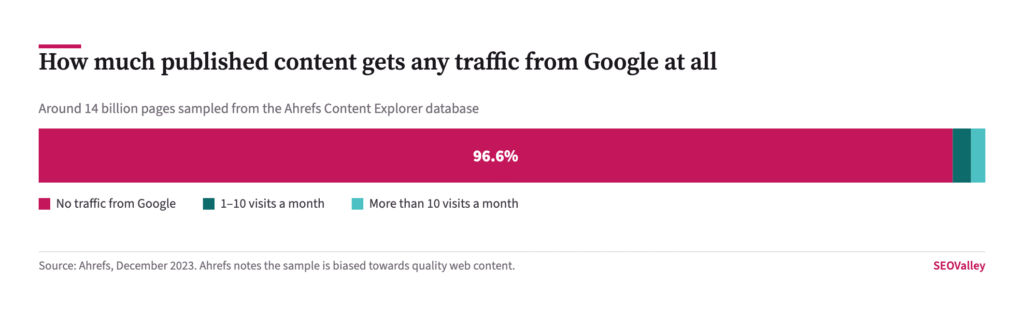
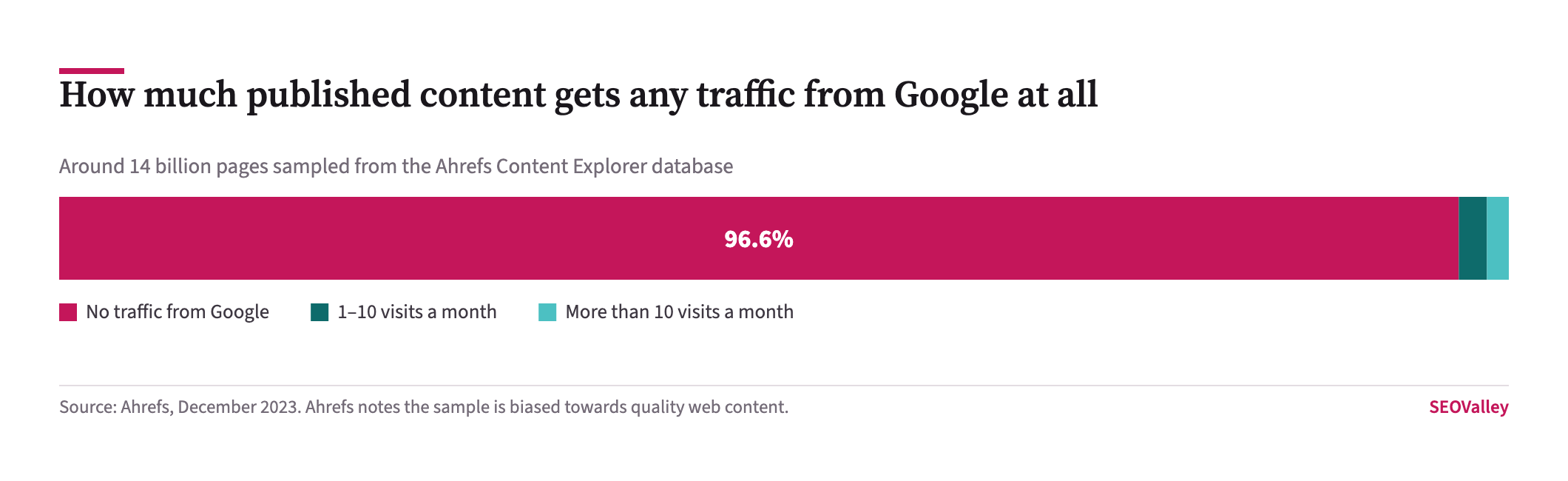
- Ahrefs studied around 14 billion pages in its Content Explorer database and found 96.55% receive no traffic from Google.
- In the same study, 1.94% of pages received between one and ten visits a month, leaving 3.45% with any measurable organic traffic.
- Ahrefs attributes most of that to three causes: no search demand for the topic, no backlinks, and a mismatch with search intent.
- Google says recovery after content changes can take days but may take several months, and if nothing has changed after a few months it may require the next core update.
- Google’s helpful content guidance recommends assessing the site as a whole and objectively, and suggests asking someone unaffiliated with the site to do it.
This article covers how to pull the data, how to sort it without guessing, what to do in each of the four cases, and how to avoid the two mistakes that make an audit actively harmful.
What data do you need before you start?
Three exports and a crawl, and the audit is largely mechanical once you have them.
The check: export the Search Console Performance report at Pages level for the last 16 months, so you have clicks, impressions and average position per URL over the longest window available. Export GA4 landing pages with key events, so you can see which URLs convert rather than merely attract. Crawl the blog with Screaming Frog for word count, internal links in, canonical and indexability. Then join all three on URL in a spreadsheet.
Why it matters: a page with zero clicks and four internal links pointing at it is a different problem from a page with zero clicks and no links at all. Without the crawl you cannot tell them apart, and you will delete the one that was holding the section together.
How do you sort pages without guessing?
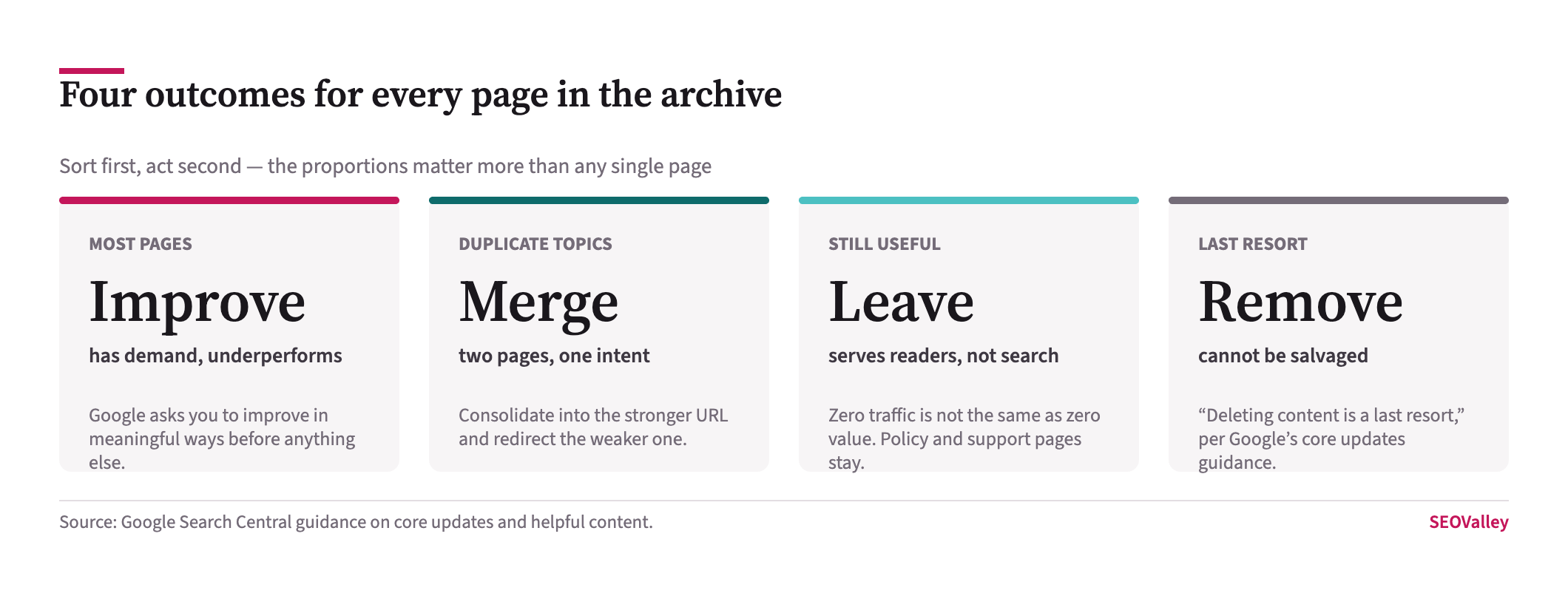
By asking two questions of each URL: does anybody search for this, and does another page of ours already answer it?
Impressions answer the first. A page with impressions and few clicks has demand and a relevance or presentation problem — that is an improve. A page with no impressions at all has no demand, or is not indexed, and improving the prose will not help.
The second question needs the query data. Where two URLs draw impressions for the same queries, you have duplication, and the fix is a merge rather than two rewrites.
Which pages should you improve?
The ones with impressions and a poor click-through rate, or an average position between about five and twenty. These have already been judged relevant by Google and are losing on the margin.
Key data: Google asks for meaningful improvement — rewriting or restructuring so the page is easier to read and navigate — and warns against quick fixes applied because something was heard to be bad for SEO.
The check: for each candidate, open the queries it earns impressions for, then read the page against those queries. Usually the page answers a slightly different question, buries the answer below a long introduction, or was written for a year that has passed. Fix the mismatch, put the answer in the first sixty words, and update the examples.
Prioritise by impressions rather than by how much you dislike the page. The post with 40,000 impressions and a 0.8% click-through rate is worth a day; the one with 12 impressions is not worth an hour, whatever its condition. Refurbishing content that already has authority is consistently the highest-return work in an archive.
Which pages should you merge?
Any set where two or more URLs compete for the same intent. This is the most common defect in an archive that has published weekly for years, because the same good idea gets written up every couple of years by different people.
What it looks like: in Search Console, filter by a head query and look at the Pages tab. If two of your URLs appear for it, and neither ranks well, they are splitting the signals.
The check: pick the URL with the stronger link profile and longer history as the survivor, fold the genuinely unique material from the others into it, then 301 the weaker URLs to it. Update internal links to point at the survivor rather than relying on the redirects, and keep the redirects permanently.
Why it matters: a merge concentrates relevance and link equity instead of discarding it, which is why it is almost always a better answer than a deletion. Two thin posts on the same topic can make one page that outranks either.
Which pages should you leave alone?
Pages with no search demand that still do a job. A pricing explanation, a policy page, a technical note customers are sent, a piece that earns links without earning traffic.
Why it matters: 96.55% of pages get no Google traffic, so zero traffic is the ordinary condition of a page rather than a diagnosis. Judging an archive purely on organic clicks removes things the business actually uses, and the complaints arrive later from sales and support rather than from search.
The check: before touching a zero-traffic URL, look at its referring domains and its internal links in. A page with external links is an asset whatever its traffic, and a page that several other pages link to is holding part of your structure together.
When is removing a page actually right?
When it cannot be salvaged and serves nobody. Google’s wording is deliberate: a last resort, only for content you think cannot be saved.
Legitimate cases exist. Auto-generated tag archives with no content. Event pages for events that happened in 2016. Duplicate imports from a migration. Pages about a product you no longer sell, where no equivalent exists to redirect to.
The check: for anything you plan to remove, confirm it has no referring domains, no internal links, no conversions in the last 16 months and no impressions. If all four are true, redirect it to the most relevant surviving page rather than returning a 404 — and if nothing is relevant, let it 410. Removing a URL with external links throws away the one thing that was hard to acquire.
What are the two mistakes that make an audit harmful?
Deleting at scale on a traffic threshold, and doing everything at once.
A rule such as “remove every page under ten visits a month” will catch policy pages, link magnets and the long tail of genuinely useful posts, because the threshold measures one thing and the archive does many. It is the quick fix Google explicitly warns against.
Doing it all in one release is the second. If you merge sixty URLs, rewrite forty and delete thirty in the same week, and traffic moves, you will not know which action caused it. Ship in batches with a fortnight between them, and record the dates — the same discipline that makes diagnosing a traffic change possible at all.
How long before you know it worked?
Longer than anyone wants. Google says some changes take effect in a few days but it may take several months for its systems to confirm the site as a whole is producing helpful content, and that if a few months pass with no effect you may be waiting for the next core update.
The check: set the measurement window before you start. Record clicks and impressions per URL for the 16 months before the work, and compare at three and six months rather than weekly. Watching it daily produces anxiety and no information.
What should you fix that is not about individual pages?
Internal linking, which an ageing archive almost always gets wrong in the same way: the newest posts are linked from everywhere and the best posts are linked from nothing.
What it looks like: a crawl showing dozens of articles with one internal link pointing at them, usually from a paginated category listing nobody reads.
Why it matters: a page reachable only from page nine of an archive listing is close to orphaned. Fixing that costs nothing in content and often moves pages that already had demand, which is why it frequently outperforms rewriting them.
The check: sort the crawl by inbound internal links ascending and cross-reference against the impressions export. Any URL with meaningful impressions and fewer than three internal links is an easy win — add contextual links to it from the related posts that already perform.
How often should the audit be repeated?
Annually for a blog publishing weekly, or whenever a migration or redesign has happened. More often than that and you will be measuring noise, given Google’s own warning that changes can take several months to be reflected.
The check: keep the joined spreadsheet from the first audit and add a dated column each time rather than starting again. The comparison between runs is more informative than any single run, because it shows which interventions actually held.
How to sort every URL in the archive
| What the data shows | Outcome | Action |
|---|---|---|
| Impressions high, clicks low, position 5–20 | Improve | Rewrite against the queries it already earns; answer in the first 60 words |
| Two URLs drawing impressions for the same query | Merge | Fold into the stronger URL, 301 the weaker, repoint internal links |
| No impressions, but has referring domains | Leave | Keep the URL; the links are the asset, not the traffic |
| No impressions, serves customers or support | Leave | Judge it on its job, not on organic clicks |
| No demand, no links, no conversions, obsolete | Remove | Redirect to the nearest relevant page; 410 only if nothing fits |
| Not indexed at all | Investigate | Check Indexing, Pages for the exclusion reason before rewriting a word |
Symptom, cause and how to confirm it
| Symptom | Likely cause | How to confirm |
|---|---|---|
| Two of your pages rank for one query, neither well | Cannibalisation | Search Console, filter the query, read the Pages tab |
| Most of the archive has zero traffic | Normal, per the 96.55% baseline | Check referring domains and internal links before acting |
| Rewrote the page, nothing changed | No search demand for the topic | Impressions were near zero before the rewrite too |
| Traffic fell after a large prune | Removed pages that carried internal links | Crawl for orphaned pages and broken internal links |
| Merged pages lost more than they gained | Redirected to a less relevant survivor | Compare the query sets of the merged URLs |
| Page excluded from the index | Noindex, canonical or crawl issue | Indexing, Pages report — read the exclusion reason |
What to do first, and what to resist
Sort before you act. Most of an archive needs improving or merging, a good deal of it should simply be left alone, and only a small remainder should be removed — which is what Google means by calling deletion a last resort. The 96.55% figure is a baseline for the web, not a verdict on your writing.
The single next action is to export Search Console Pages for 16 months and sort by impressions with clicks near zero. Those URLs already have demand and are failing to convert it, which makes them the cheapest wins in the archive and the right place to spend the first week.
What not to do: do not delete on a traffic threshold, do not ship every change in one release, and do not judge a page on clicks alone before checking its links and its job. If the archive has grown past the point where anyone can hold it in their head, an SEO audit that joins crawl data to Search Console data will sort it faster than reading posts one by one, and our blog marketing team plans the rewrite queue from that sheet rather than from opinion.
About the author
Shabir MS leads SEOValley Solutions and has worked in search since 2005. He has audited archives ranging from forty posts to several thousand, and has spent more time undoing over-enthusiastic content prunes than recommending them. Read more from Shabir MS.
Frequently asked questions
Should I delete old blog posts?
Rarely. Google states deleting content is a last resort, only for content that cannot be salvaged. Improving or merging usually returns more than removing.
What percentage of pages get no Google traffic?
96.55%, on Ahrefs’ study of around 14 billion pages. Zero traffic is the ordinary condition of a published page rather than a fault.
How do I find cannibalising pages?
In Search Console, filter the Performance report by a head query and open the Pages tab. If two of your URLs appear, they are splitting the signals.
Should I merge or rewrite two similar posts?
Merge. Fold the unique material into the URL with the stronger link profile, 301 the weaker one, and repoint internal links at the survivor.
Which pages are worth improving first?
Those with high impressions, low clicks and an average position between about five and twenty. Google already considers them relevant; they are losing at the margin.
Is zero traffic a reason to delete a page?
No. Check referring domains, internal links and whether the page serves customers. A page with external links is an asset regardless of its traffic.
Should I 404 or redirect a removed page?
Redirect to the nearest relevant surviving page. Use 410 only when nothing relevant exists, and never remove a URL that has external links.
How long until a content audit shows results?
Days to several months, per Google. If nothing has changed after a few months, the effect may not appear until the next core update.
What data do I need for a blog audit?
Search Console Pages for 16 months, GA4 landing pages with key events, and a crawl for word count, internal links and indexability — joined on URL.
Why did traffic fall after I pruned content?
Most often because removed pages carried internal links. Crawl for orphaned pages and broken links, and reinstate redirects where they were missed.
Can I use a traffic threshold to decide what to delete?
No. A blanket rule catches policy pages, link magnets and useful long-tail posts. Google specifically warns against quick fixes of this kind.
Should I audit everything at once?
No. Ship in batches with a fortnight between them and record the dates, or you will not be able to attribute whatever happens next.