+91 9893014167
  1 (888) 316-3286
 +44 20 3807 2189
 Chat on WhatsApp

Last updated: 19 September 2026
Someone has sent a list of 4,000 images to compress. The developer wants three days for it. Nobody has asked which of them are costing anything.
Image work is easy to spend a fortnight on and hard to show a result from, because most of the effort goes on images that were never the problem.
Two things matter far more than bulk compression: the one image that decides your Largest Contentful Paint, and whether Google can understand what your images show. Everything else is housekeeping. The single most damaging image mistake on the web is lazy-loading the image the page is being timed on, and it affects roughly one in ten pages that have an image as their LCP element.
Key Facts
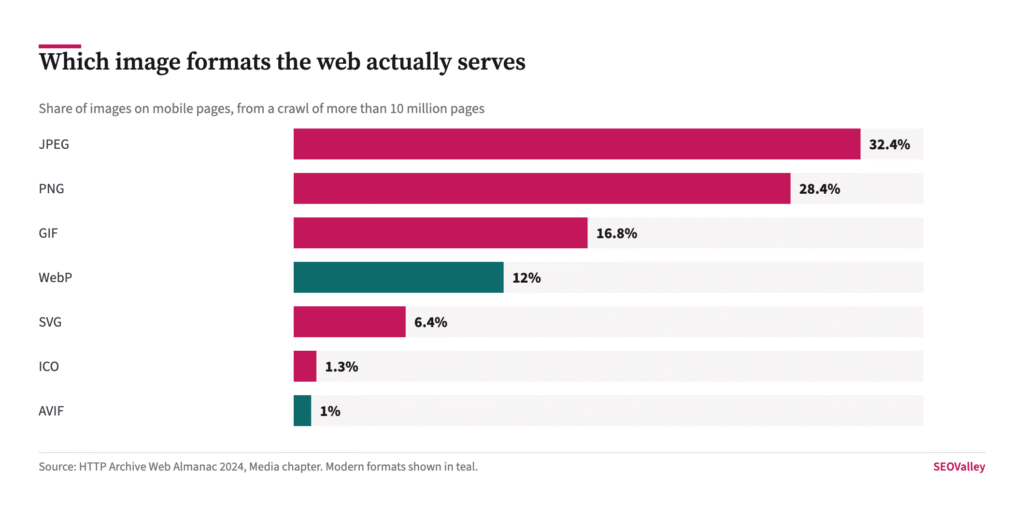
- On mobile pages, JPEG accounts for 32.4% of images, PNG 28.4% and GIF 16.8%, while WebP reaches 12% and AVIF just 1.0%, per the HTTP Archive Web Almanac 2024 crawl of more than 10 million pages.
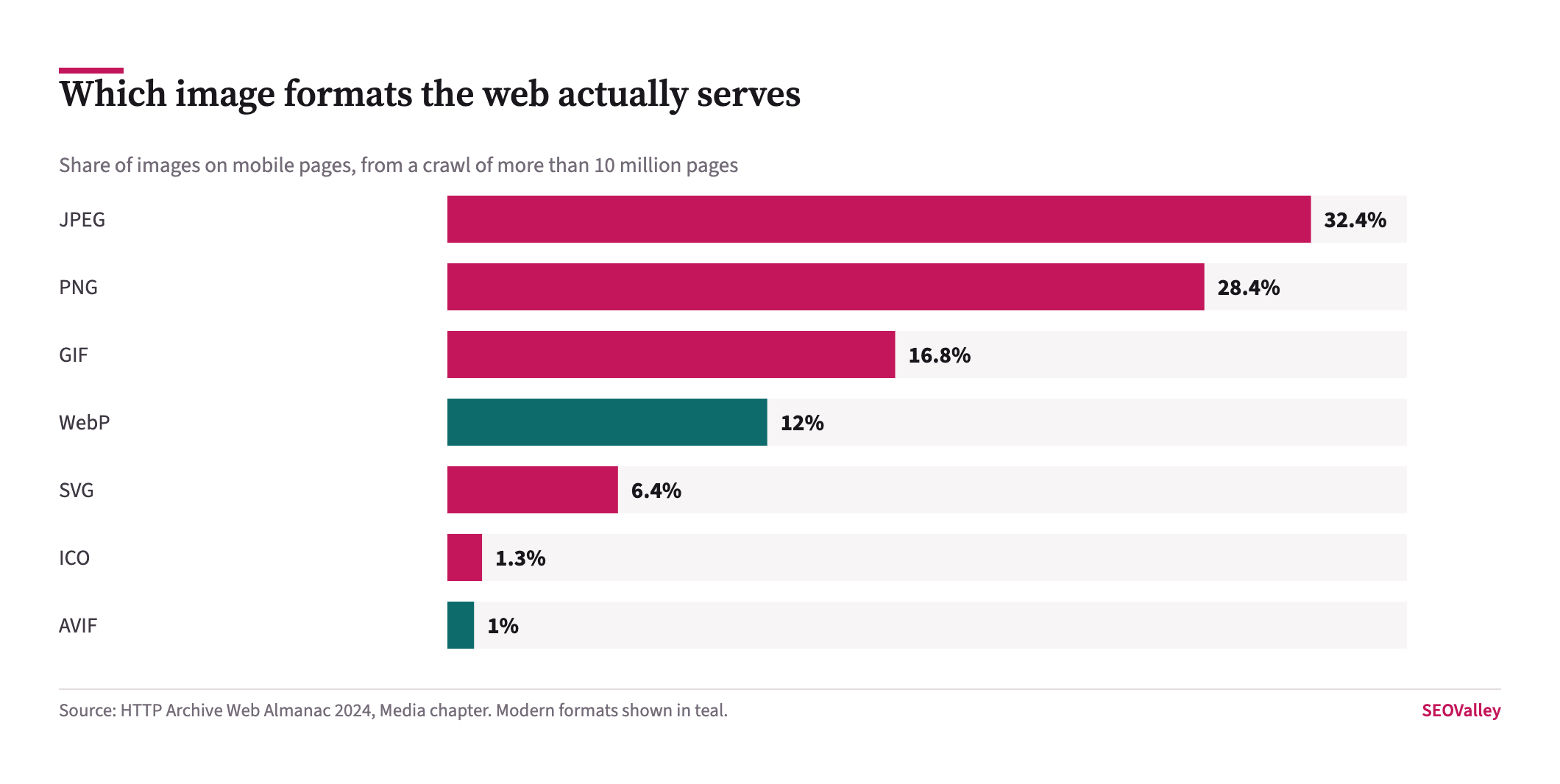
- 55% of images carried a non-blank alt attribute, meaning 45% carried none, an improvement of one percentage point since 2022.
- About one third of websites used native lazy-loading in 2024, up from roughly a quarter in 2022.
- Around 9.5% of images responsible for Largest Contentful Paint were incorrectly set to lazy-load, which the Web Almanac identifies as a performance anti-pattern.
- 42% of mobile pages used srcset and 9.3% used the picture element, while only 32% of images declared width and height attributes.
- Google indexes images in BMP, GIF, JPEG, PNG, WebP, SVG and AVIF, and only from the src attribute, images set as CSS backgrounds are not indexed.
- Google states that sharp images are more appealing in the result thumbnail and can increase the likelihood of getting traffic.
This article covers the one image that decides your loading score, what Google needs in order to index and understand an image, which format choices are worth making, and which parts of the standard image-optimisation checklist are not worth the developer time.
Which Image Is Actually Costing You?
Almost always a single one: the largest element visible when the page first renders, which on most templates is the hero image.
What it looks like: a page that fails Largest Contentful Paint while every individual image on it is under 100KB.
Why it matters: Largest Contentful Paint is timed against one element, not against your total page weight. Compressing 3,999 images below the fold changes nothing about it.
The check: run a failing URL through PageSpeed Insights and read the LCP element it names in the diagnostics. That is the image to work on. Serve it at the dimensions it actually renders, in a modern format, and make sure nothing defers it.
What Is The Single Most Damaging Image Mistake?
Lazy-loading the LCP image, which tells the browser to defer the very thing it is being measured on.
Key data: about 9.5% of LCP-responsible images were lazy-loaded in the 2024 crawl.
Why it matters: it usually arrives by accident. A plugin or theme applies loading=”lazy” to every image on the site as a blanket optimisation, and the hero image is caught along with everything else. The setting that was meant to speed the page up is the reason it fails.
The check: view source on your main templates and look at the first image in the markup. If it carries loading=”lazy” remove that attribute from the hero specifically. Add fetchpriority=”high” to it instead, and keep lazy-loading for everything below the fold, which is where it genuinely helps. This is the cheapest fix in the whole of Core Web Vitals work.
What Does Google Need To Index An Image?
A crawlable src attribute in the HTML, in a supported format. Everything else is context.
Key data: Google indexes BMP, GIF, JPEG, PNG, WebP, SVG and AVIF, and takes images only from src attributes. Images applied through CSS backgrounds are not indexed.
Why it matters: a design team that renders product photography as CSS backgrounds has removed that catalogue from Google Images entirely, and no amount of alt text elsewhere compensates.
The check: view source on a product or gallery page and confirm the images appear as img elements with a src, rather than as background-image declarations in CSS. If you rely on images for discovery, submit an image sitemap as well, which Google recommends for images it might otherwise miss.
How Should Alt Text Be Written?
As a description of what the image shows, in the context of the page it sits on. Google asks for useful, information-rich content that uses keywords appropriately, and warns that keyword stuffing produces a poor user experience and may be seen as spam.
Key data: 45% of images on the web carry no alt text at all, so the common failure is absence rather than poor wording.
Why it matters: alt text is the primary way a machine and a screen-reader user learn what an image contains. For a chart it should carry the figures, because the numbers are the content, a reader who cannot see the chart should still get the finding.
The check: crawl the site and filter for images with missing or empty alt attributes. Fix the ones inside article content first; purely decorative images should carry an empty alt deliberately rather than by omission, so assistive technology skips them.
Which Format Should You Actually Use?
WebP for photographs and screenshots, and keep the original as a fallback if your audience includes very old browsers. AVIF compresses better again but sits at 1.0% adoption, and the tooling around it is still less predictable.
Why it matters: format conversion is the part of image work with the clearest return, because it reduces bytes without changing anything a reader sees. Moving a 400KB JPEG hero to WebP typically halves it.
The check: rather than converting the whole library, convert what appears above the fold on the highest-traffic templates and measure. PNG is worth attention specifically where it has been used for photographs, which is the most common source of oversized images on a site.
Do You Still Need Width And Height Attributes?
Yes, and only 32% of images have them. They are what lets the browser reserve space before the image arrives, which is most of Cumulative Layout Shift solved.
The check: in PageSpeed Insights, open the CLS diagnostic and read which element shifts. It is usually an image without dimensions, an ad slot without a reserved height, or a cookie banner injected above existing content.
Setting both attributes costs nothing and needs no new tooling. It is the highest ratio of benefit to effort anywhere in this article.
What About Responsive Images?
Worth doing where a template serves the same image to a phone and a desktop, which is the usual case.
Key data: 42% of mobile pages used srcset in 2024 and 9.3% used the picture element.
Why it matters: sending a 2,000-pixel-wide hero to a 390-pixel-wide phone screen wastes bandwidth on exactly the connection least able to afford it, and mobile is where most sites fail their loading metric.
The check: load a page on a phone, inspect the hero image, and compare its intrinsic width against its displayed width. A ratio above about two means you are shipping four times the pixels needed.
How Do Images Affect What AI Systems Can Use?
Less than is often suggested, and not in a way that needs new markup. Google’s guidance asks for high-quality, relevant images as part of good content, and makes no separate image requirement for its AI features.
Why it matters: a page whose argument lives entirely inside an image is a page a text-extracting system cannot quote. If your only statement of a figure is a number rendered inside a chart, that figure does not exist to anything reading the HTML.
The check: for each chart or diagram, confirm the key figure also appears in the surrounding prose, the alt text or the caption. That single habit makes the content extractable without changing anything visual, and it is the same discipline that underpins being cited by AI systems at all.
What Should A Caption Do?
Say what the image demonstrates and where it came from, rather than repeating the heading above it. Google notes that it extracts context from captions and titles, and a caption is read far more often than body copy.
What it looks like: a caption that states the finding, not “Chart showing traffic data” but what the chart actually shows and the named source behind it.
The check: read your captions on their own, with the images hidden. If a caption tells a reader nothing they could not guess from the heading, rewrite it to carry the finding and end it with the source.
Which Image Work Is Not Worth The Time?
Bulk-compressing an entire media library to shave kilobytes off images nobody loads. Converting decorative icons to AVIF. Renaming thousands of historical files for keywords, which risks breaking links for a marginal signal.
Filenames are worth getting right for new uploads, where Google asks for descriptive names such as my-new-black-kitten.jpg rather than image1.jpg. Retrospectively renaming an archive is a different proposition, and the redirect maintenance usually outweighs the benefit.
Also treat image-heavy page-speed reports with suspicion when they list every asset by size. The list is easy to generate and tells you nothing about which image the browser is waiting on.
How Should Image Work Be Reported?
As a change in the Largest Contentful Paint pass rate for the affected templates, on field data, with the deployment date marked. Not as kilobytes saved.
Why it matters: total bytes removed is the easiest number to produce and the least connected to anything a visitor experiences. A report showing four megabytes saved across a library, with no change in the pass rate, describes effort rather than outcome.
The check: before starting, note which URL groups fail Largest Contentful Paint in Search Console and on which device. Compare the same groups a month after the change, since field data moves on a 28-day rolling window rather than immediately.
What To Fix, In Order
| Priority | Fix | Why it comes here |
|---|---|---|
| 1 | Remove lazy-loading from the LCP image | Affects ~9.5% of pages with an image LCP; one attribute, measurable effect |
| 2 | Add width and height to images | Only 32% of images have them; solves most layout shift |
| 3 | Convert above-the-fold images to WebP | Typically halves the bytes on the element being timed |
| 4 | Add alt text inside article content | 45% of images have none; needed for indexing and accessibility |
| 5 | Add srcset on templates serving one size | Stops phones downloading desktop-sized images |
| 6 | Submit an image sitemap | Only where image discovery matters commercially |
Symptom, Cause And How To Confirm It
| Symptom | Likely cause | How to confirm |
|---|---|---|
| LCP fails but every image is small | The LCP image is deferred, not heavy | PageSpeed Insights names the LCP element; check it for loading=”lazy” |
| Layout jumps as the page loads | Images without width and height | PageSpeed Insights CLS diagnostic names the shifting element |
| Product images absent from Google Images | Rendered as CSS backgrounds | View source, images must be img elements with a src |
| Mobile far slower than desktop | One image size served to every device | Compare intrinsic width against displayed width on a phone |
| Compressed everything, nothing improved | Effort spent below the fold | Only the LCP element is timed; check which one it is |
| Screen reader announces nothing useful | Missing or decorative-only alt text | Crawl for empty alt attributes inside article content |
What To Do This Week
Image optimisation pays when it is aimed at one image and one attribute, and disappoints when it is aimed at a library. The Web Almanac data shows the web is still serving mostly JPEG and PNG, still missing alt text on 45% of images, and still lazy-loading around one in ten LCP images, and that last one is the defect with the clearest cost.
The single next action is to view source on your highest-traffic template and look at the first image in the markup. If it carries loading=”lazy” remove it and add fetchpriority=”high”. That is a one-line change with a measurable effect on a metric Google actually assesses.
What not to do: do not commission a bulk compression project before you know which image is being timed, do not rename an archive of filenames for keywords, which creates the kind of redirect debt that a content audit later has to unpick, and do not convert decorative icons to modern formats to raise a score. If images are central to how customers find you, an SEO audit that crawls for missing alt text, absent dimensions and CSS-background images will produce a shorter and more useful list than any page-speed report, and our content team writes alt text that carries the figures rather than repeating the headline.
About The Author
Shabir MS leads SEOValley Solutions and has worked in search since 2005. He has audited enough sites to have seen the same lazy-loading plugin break the hero image on all of them, and now checks that attribute before anything else. Read more from Shabir MS.
Frequently Asked Questions
Which image formats does Google index?
BMP, GIF, JPEG, PNG, WebP, SVG and AVIF. Google takes images from the src attribute only, so CSS background images are not indexed.
What is the most damaging image mistake for page speed?
Lazy-loading the LCP image. Around 9.5% of LCP-responsible images were set to lazy-load in the Web Almanac 2024 crawl.
Should I lazy-load all images?
No. Lazy-load below the fold only. The hero image should load eagerly, ideally with fetchpriority=”high” so the browser prioritises it.
How many images on the web have alt text?
55% carry a non-blank alt attribute, so 45% have none. That was a one percentage point improvement over 2022.
How should I write alt text?
Describe what the image shows in the context of the page. For a chart, include the key figures. Google warns that keyword stuffing may be treated as spam.
Should decorative images have alt text?
They should carry a deliberately empty alt attribute so assistive technology skips them, rather than having the attribute omitted entirely.