+91 9893014167
  1 (888) 316-3286
 +44 20 3807 2189
 Chat on WhatsApp

Last updated: 11 October 2026
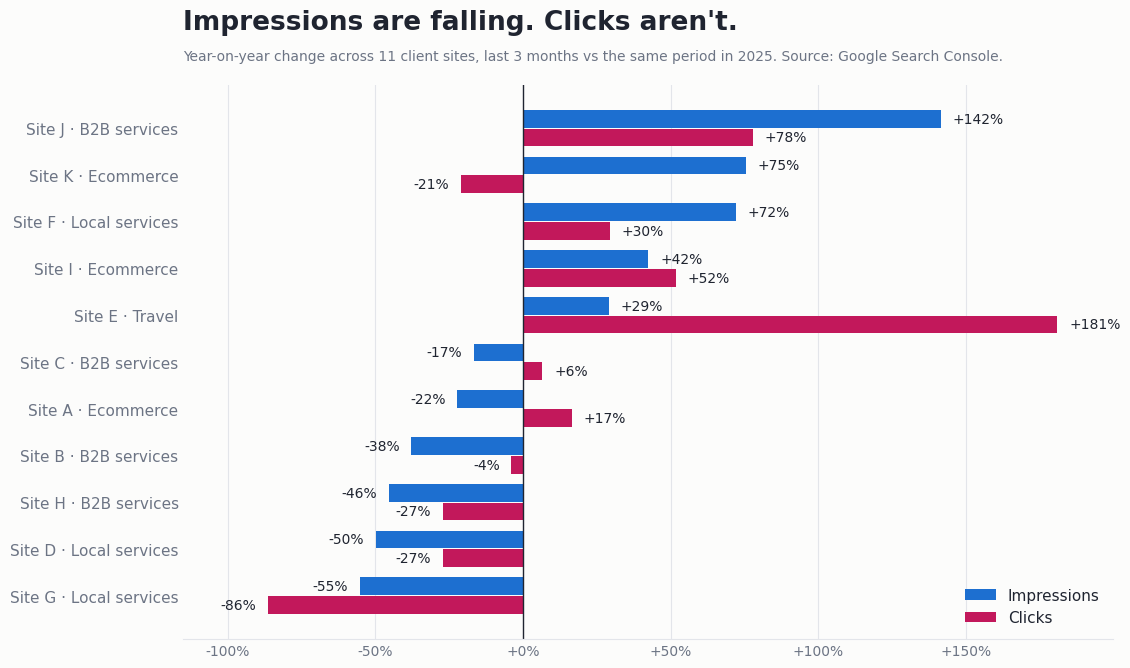
Picture a business owner opening Search Console in late September 2025. Impressions have dropped by almost half in a fortnight. Average position has improved at the same time. Clicks haven’t moved, and enquiries are steady.
Nothing is wrong with the site. Google changed how results are fetched, and the numbers shifted underneath it. Most sites saw some version of this, and it shows why a monthly SEO report built in 2021 no longer works.
A useful report now shows four things side by side: clicks against rankings, visibility inside AI answers, leads tracked as key events, and every link built with its live URL. Anything else is decoration.
Key facts
- Pew Research Center found in July 2025 that Google users clicked a traditional result in 8% of visits when an AI summary appeared, against 15% when none did.
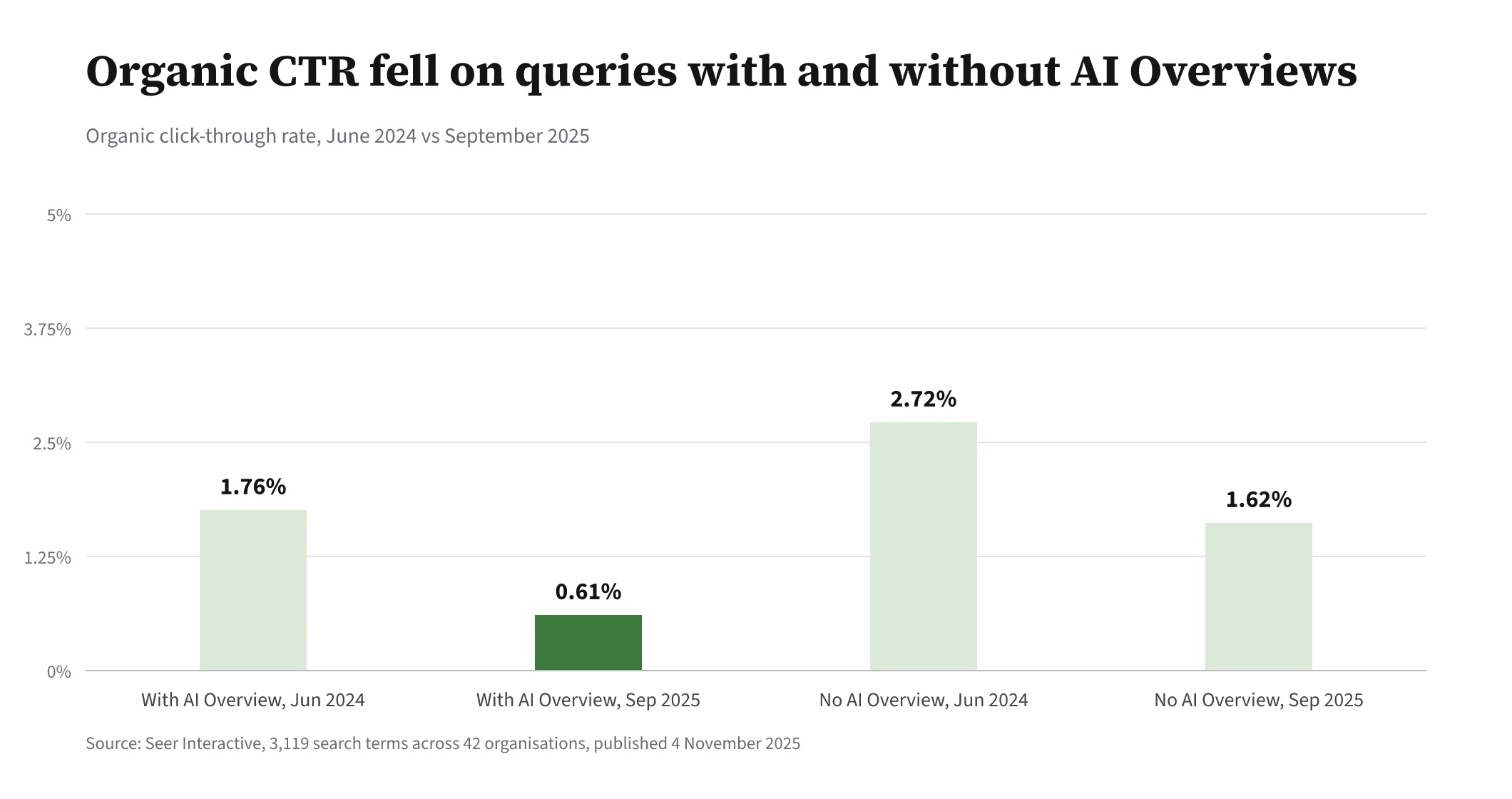
- Seer Interactive reported in November 2025 that organic click-through rate on queries showing AI Overviews fell from 1.76% in June 2024 to 0.61% in September 2025.
- An analysis of 319 sites by LOCOMOTIVE Agency, reported in September 2025, found 87.7% saw Search Console impressions fall after Google stopped supporting the num=100 parameter.
- Google launched Search Generative AI performance reports in Search Console on 3 June 2026 and rolled them out to all websites by 31 August 2026.
- Ahrefs reported in June 2025 that AI search sent 0.5% of its traffic over 30 days but produced 12.1% of its sign-ups.
- Google Analytics 4 renamed conversions to key events in 2024, keeping the word conversion for actions shared with Google Ads.
This article walks through what belongs in a monthly SEO report today: why rankings and clicks have drifted apart, what the September 2025 Search Console change did to impressions, how AI Overviews and AI Mode hit click-through rate, how to report AI visibility, which GA4 numbers matter, and how to report links so they can be checked.
Why do rankings and clicks no longer move together?
Because the page above the first organic result has filled up. A position-three ranking in 2019 meant a visible blue link. In 2026 that same position can sit below an AI Overview, a map pack, a video carousel and four ads.
The numbers are stark. Pew Research Center’s study of 68,879 Google searches by 900 US adults in March 2025 found people clicked a traditional result in 8% of visits when an AI summary appeared. Without a summary, they clicked in 15% of visits. Only 1% of visits involved a click on a link inside the summary itself.
So a report that says “you moved from 6 to 3” and stops there is telling half the story. Sometimes the ranking gain is real and the clicks simply aren’t there to win any more.
We see this most on informational keywords: definitions, how-tos, cost questions. Commercial searches with a clear next step, like “emergency plumber near me”, still send clicks. A good report splits the two so the owner can see which group is carrying the business. We wrote more about the causes in 10 reasons your rankings hold but your clicks keep falling.
What happened to Search Console impressions in September 2025?
They dropped for most sites because Google stopped honouring the &num=100 parameter, which rank trackers had used to load 100 results on one page. Around 10 to 14 September 2025 that stopped working, and Google told Search Engine Land the parameter was not something it formally supported.
Here is why that mattered. When a scraper loaded 100 results, every site on positions 11 to 100 could log an impression, even though no human ever saw it. Remove the scraper loads and those phantom impressions vanish.
Tyler Gargula at LOCOMOTIVE Agency analysed 319 properties after the change: 87.7% saw impressions decline and 77.6% lost unique ranking terms. Average position looked better on many of them, purely because deep, low-position impressions were no longer counted.
Two practical rules follow. First, any report comparing impressions or average position across September 2025 needs a note saying so, or the client will read a measurement change as a collapse or a triumph. Second, clicks were largely unaffected, which is one more reason to lead with clicks rather than impressions.
How much are AI Overviews and AI Mode cutting click-through rate?
A lot, on the queries where they appear. Seer Interactive tracked 3,119 search terms across 42 organisations and found organic CTR on queries with an AI Overview fell from 1.76% in June 2024 to 0.61% in September 2025, a 61% drop. Queries without an AI Overview fell too, from 2.72% to 1.62%.
That second figure surprised me more than the first. Even searches with no AI box lost 41% of their click-through rate. Some of that is ads and other SERP features; some is people learning to expect the answer on the page.
There is a brighter detail in the same study. Brands cited inside an AI Overview earned 35% more organic clicks than those not cited, though Seer is careful to say it can’t prove the citation caused it.
For a monthly report, this means CTR should be shown by query group, not as one site-wide average. A falling blended CTR on a site that has just started ranking for lots of informational terms is normal. A falling CTR on your money keywords is a problem worth a conversation.
How should a report show visibility in ChatGPT, Gemini and Perplexity?
As a set of measured answers to fixed prompts, tracked month to month, alongside the referral traffic those assistants actually send. There is no single “AI ranking” to report, so anyone showing you one number for it is simplifying.
Google has at least made its own side easier. Its AI features documentation confirms AI Overviews and AI Mode traffic is counted inside the normal Performance report under the Web search type. Then on 3 June 2026 Google launched Search Generative AI performance reports in Search Console, showing impressions, pages, countries, devices and dates for AI features. It reached every website by 31 August 2026. Note what it lists: impressions, not clicks.
For ChatGPT, Gemini, Perplexity and Copilot, a report should show three things:
- Mentions: how often the brand is named in answers to the prompts your buyers use.
- Citations: how often your pages are linked as a source, and which pages.
- Referral sessions and leads: visits from those assistants in GA4, and what those visitors did.
The volumes are small for most businesses, but they can be valuable. Ahrefs reported that AI search sent 0.5% of its traffic over 30 days yet produced 12.1% of its sign-ups. That is one company’s data, and its author doubts it will hold at scale, but it is the right way to frame the numbers: by outcome, not by volume. For a real example of what this looks like over time, our Australian tiny-house builder case study shows AI answers in Google AI Overviews, AI Mode, ChatGPT, Perplexity and Gemini linking to the client as a source 2,755 times. We cover the method in more depth in how to measure AI visibility when there is no rank to track.
Which GA4 numbers belong in the report, and which are vanity?
Key events from organic search belong at the top: form submissions, calls, bookings, purchases, quote requests. Sessions, pageviews and bounce rate belong further down, if at all.
Google Analytics 4 now calls these key events, keeping the word conversion for actions shared with Google Ads. The rename is cosmetic. What matters is that someone has actually marked the right events as key, and tested that they fire. A broken form tag is one of the commonest reasons an owner concludes SEO “stopped working”.
My view on vanity metrics is blunt. Total sessions tell you almost nothing on their own. A blog post that ranks for a trivia question can double traffic and produce zero enquiries. I would rather see 40 organic leads with their landing pages than 40,000 sessions with no context.
Three GA4 views earn their place every month:
- Organic key events by landing page, so you can see which pages earn the business.
- Referral sessions from AI assistants, grouped together. ChatGPT often adds
utm_source=chatgpt.comto its links, which helps. - Organic key events this month against the same month last year, to strip out seasonality.
If you want a refresher on the reports inside GA4 that answer search questions, see GA4 for SEO.
| Metric | Why it misleads on its own | What to show with it |
|---|---|---|
| Average position | Moves when the measurement changes, as it did in September 2025 | Clicks and CTR for the same keyword group |
| Impressions | Inflated before September 2025 by scraper loads | Clicks, with a note on the date of the change |
| Total sessions | Counts visits that never lead anywhere | Organic key events by landing page |
| Keywords in top 10 | Ignores AI answers and SERP features above the result | AI Overview and AI Mode impressions from Search Console |
| Backlinks created | Unverifiable without the page | Live URL, target page, anchor, date, indexed or not |
| AI mentions | Says nothing about traffic or revenue | Citations, AI referral sessions and leads |
How should links built be reported so they can be checked?
With the live URL of every link, the page it points to, the anchor text and the date it went live. If a client can’t click through and see the link, it shouldn’t be in the report.
This sounds obvious. It isn’t common. Plenty of reports still list “25 backlinks created” with a domain rating next to each, and no way to verify any of them. Some of those links are on pages that are never indexed. Some disappear within weeks.
A link table should also show whether each link is still live at report time, and whether the linking page is indexed. Lost links should be listed, not quietly dropped. Over a year, that honesty builds more trust than any growth chart.
What does a good monthly SEO report look like as a whole?
Short at the top, detailed underneath. The first page should answer one question in plain words: did organic search bring in more business this month, and why?
Below that, the order we’d suggest is clicks and key events, then keyword groups with ranking and CTR side by side, then AI visibility, then work done and links built with live URLs, then what happens next month. Every chart should carry a note when a measurement change, like the September 2025 impressions drop, affects it.
The best reports also say what didn’t work. A page that was rewritten and didn’t move, a link campaign that underperformed. Clients forgive slow months. They don’t forgive surprises.
Pull up your last monthly SEO report and check it against this list. Does it lead with leads and clicks, or with rankings? Does it flag the September 2025 change? Does it show AI visibility at all? Can you click every link?
If the answer to most of those is no, the report isn’t lying to you, but it isn’t helping you decide anything either. Ask for the version that does. If you’d like search reporting tied to leads from day one, take a look at our analytics services.
About the author
Shabir MS leads SEOValley Solutions and has worked in search since 2005. These days most of his time goes on how brands show up in AI answers, and on separating what the data actually shows from what gets said at conferences. Read more from Shabir MS.
Frequently asked questions
Why did my Search Console impressions drop but clicks stay the same?
Most likely because Google stopped supporting the num=100 parameter around 10 to 14 September 2025. Rank trackers had been generating impressions that no human saw, and those disappeared, so impressions fell while clicks held.
Should average position still be in an SEO report?
Yes, but by keyword group and never on its own. Show it next to clicks and CTR, and flag any period that crosses September 2025, when the measurement changed.
Can Search Console show clicks from AI Overviews separately?
Not as a separate click figure. AI feature traffic is counted in the normal Performance report under Web, and the Generative AI performance reports launched in June 2026 list impressions, pages, countries, devices and dates.
How often should AI visibility be measured?
Monthly is enough for most businesses, using the same set of prompts each time so the trend means something. AI answers vary from run to run, so single checks are unreliable.
What is the single most important number in an SEO report?
Organic key events, meaning leads, calls, bookings or sales from organic search, compared with the same month last year. Everything else in the report should help explain that number.