+91 9893014167
  1 (888) 316-3286
 +44 20 3807 2189
 Chat on WhatsApp


Last updated: 19 September 2026
The audit came back as a 140-page PDF with 400 issues, colour-coded red. Nobody knows which three to fix on Monday.
An audit that lists everything ranks nothing. The value is in the order, because most of those 400 items cannot affect a single ranking and two of them are quietly costing you a whole section of the site.
Work outwards from what stops a page existing in search at all. Can Google reach it, render it, index it, and pick the URL you intended? Those four questions account for nearly every technical problem worth money. Presentation issues, title lengths, missing descriptions, schema gaps, come after, because a page that is not indexed cannot benefit from any of them.
Key Facts
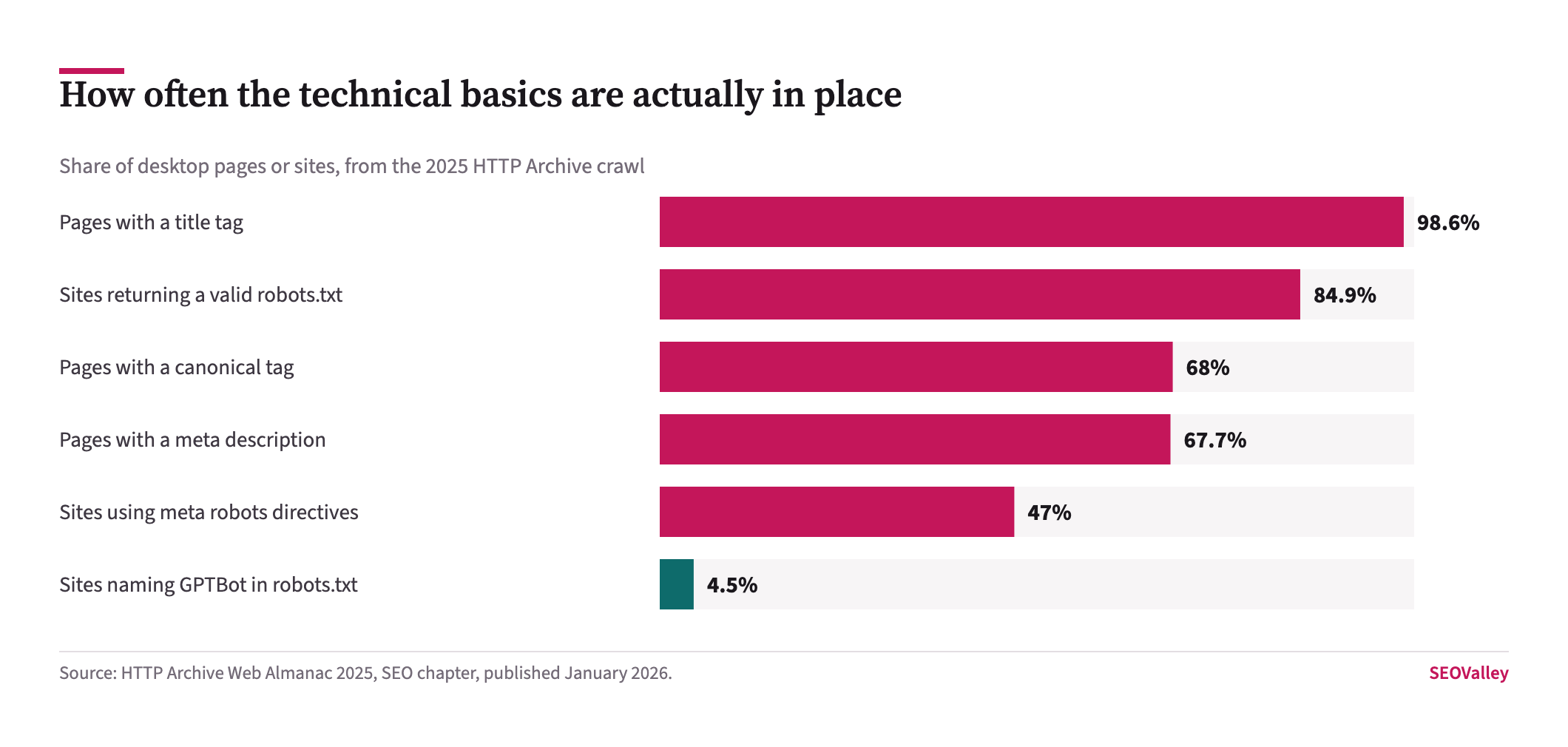
- 84.9% of sites returned a valid robots.txt in the 2025 HTTP Archive crawland 13% returned a 404.
- 68% of desktop pages carried a canonical tag, leaving roughly a third relying on Google to choose the canonical URL itself.
- 98.62% of desktop pages had a title tag, making it the one element almost nobody is missing.
- 67.7% of desktop pages had a meta description, so about a third have none at all.
- The median meta description ran 274 characters, well beyond what Google typically displays, and the median title tag ran 77 characters.
- Only 48% of mobile origins passed all three Core Web Vitals in July 2025 field data, and LCP was the metric most sites failed.
- Around 9.5% of images responsible for Largest Contentful Paint were set to lazy-load, an anti-pattern that defers the element being measured.
What follows is the order we work in, the specific report or setting that answers each question, and the small number of findings usually worth acting on first. It runs from crawlability through to presentation, because that is the sequence in which problems block each other.
Where Should A Technical Audit Start?
With whether Google can fetch the page at all, because everything downstream depends on it.
What it looks like: a section of the site that has simply never appeared in Search Console, rather than one that appears and ranks poorly.
Key data: 13% of sites returned a 404 for robots.txt in the 2025 crawl. A missing robots.txt is not itself a fault, Google treats it as permission to crawl everything, but it usually signals that nobody has looked.
The check: request your robots.txt directly and read it line by line. Then open Search Console, Settings, Crawl stats, and look at the response-code breakdown. A rise in 5xx responses or a collapse in crawl requests dates a server-side problem precisely, which no crawler simulation can do.
Is The Site Actually Being Indexed?
This is the question that separates a real problem from a cosmetic one, and it has a definitive answer rather than an estimate.
The check: open Indexing, then Pages. Read the totals for indexed against not indexed, then work through the exclusion reasons. “Excluded by noindex tag” on pages that should rank is a shipped mistake. “Crawled – currently not indexed” in volume is usually a quality or duplication signal rather than a technical fault. “Discovered – currently not indexed” points at crawl capacity or internal linking.
Why it matters: those three exclusion reasons have completely different fixes, and a report that lists them together as “indexation issues” has done none of the work. Compare the indexed count against three months ago; a steady decline is the clearest early warning a site gives.
Does The Page Render For A Crawler?
Increasingly the question that matters most, and the one a response-code crawl cannot answer.
What it looks like: the page looks complete in a browser, and the main content is absent from the fetched HTML because it arrives through a client-side request afterwards.
The check: use the URL Inspection tool in Search Console, run Test Live URL, and open the rendered HTML rather than the screenshot. Search it for a distinctive sentence from the body copy. If the sentence is missing, Google is not seeing your content, whatever the crawler report says.
Why it matters: Google’s generative features draw on publicly accessible crawlable contentso a rendering gap now costs visibility in AI answers as well as in ordinary results. An audit that never renders a page will miss this entirely.
Is Google Choosing The URL You Intended?
Often not, and duplication is where most large-site traffic quietly goes missing.
Key data: 68% of desktop pages carried a canonical tag in the 2025 crawl, so roughly a third leave the choice to Google.
The check: in URL Inspection, compare “User-declared canonical” against “Google-selected canonical”. Where they differ, Google has overruled you, and that is worth understanding before you change anything, it usually means the two pages are more alike than you think.
Why it matters: parameters, faceted navigation, printer-friendly versions, session IDs and trailing-slash variants all generate near-duplicates. Consolidating them concentrates signals rather than discarding them, which is the same logic that applies when two blog posts compete for one query.
Which Technical Faults Are Actually Worth Fixing?
The ones that change whether a page can be found, then the ones that change how many people click it.
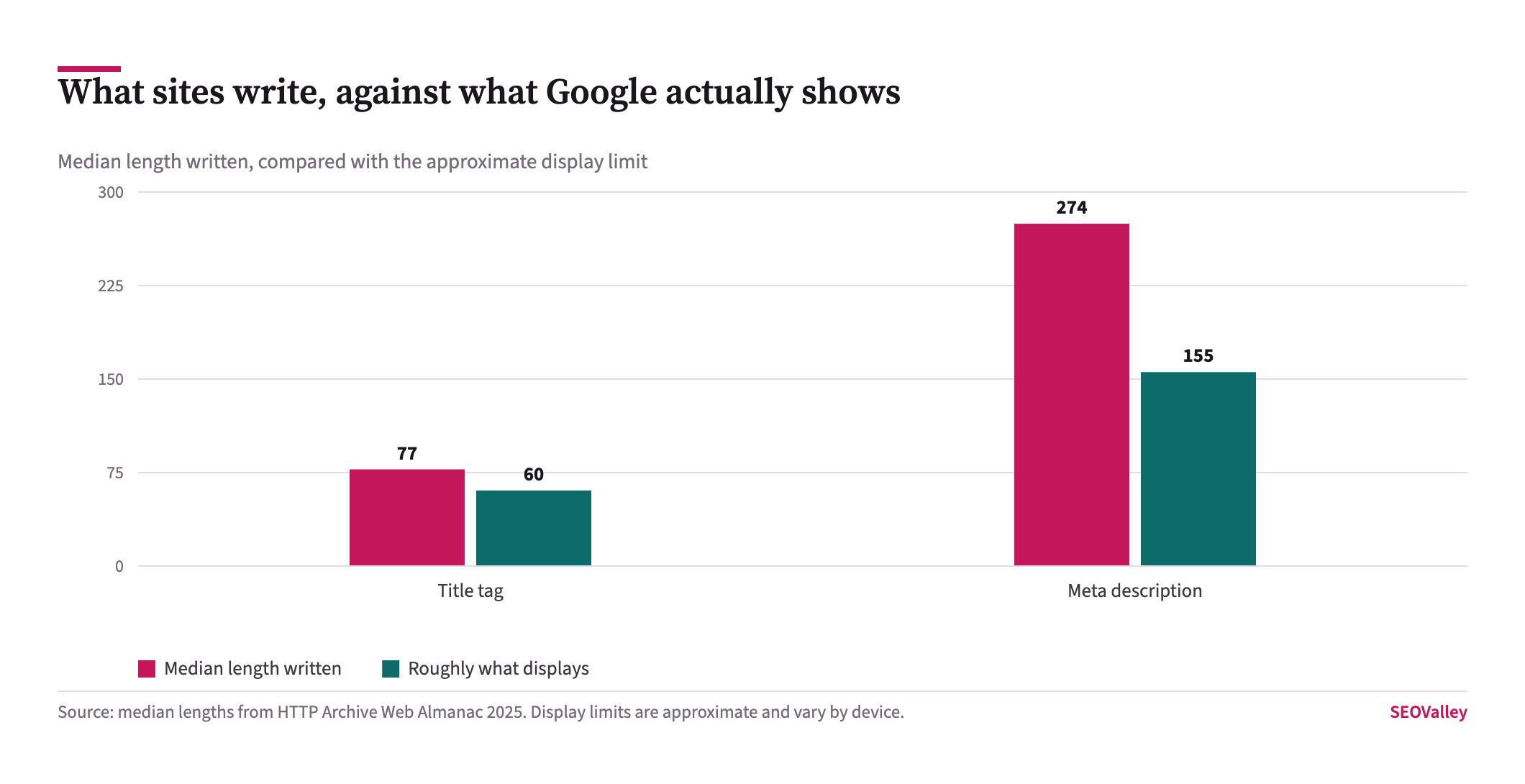
Key data: the median meta description ran 274 characters and the median title 77 characters, both comfortably past what results pages typically display.
Why it matters: a truncated description is not a ranking problem, and it is a click problem on pages that already earn impressions. That makes it cheap, measurable work, unlike most of what fills an audit document.
The check: export Search Console Pages, sort by impressions with a low click-through rate, and rewrite only those titles and descriptions. Fixing the other nine hundred achieves nothing you can measure.
How Does Speed Fit Into A Technical Audit?
As one section, judged on field data rather than on a score.
Key data: 48% of mobile origins passed Core Web Vitals in July 2025, and LCP was the metric most sites failed. Around 9.5% of LCP images were set to lazy-load.
The check: open the Core Web Vitals report, select Mobile, and note which metric names the largest failing URL group. Then take one URL from that group to PageSpeed Insights and read the named LCP element. The fix is usually one template rather than a rebuild, and the detail sits in our guides to Core Web Vitals after INP and image optimisation.
How Often Should A Site Be Audited?
A full audit annually, plus a short standing check monthly and an immediate one after any migration, redesign or platform change.
Why it matters: most serious technical faults are shipped rather than grown. They arrive with a release, and the gap between the release and the discovery is what determines the cost. A monthly ten-minute check of indexed page count, crawl stats and manual actions catches most of them inside a single crawl cycle.
The check: keep the same spreadsheet each time and add a dated column rather than starting fresh. The comparison between runs tells you more than any individual run, because it shows which fixes held.
Which Tools Do You Actually Need?
Fewer than most audit templates imply. Search Console answers the questions that decide whether a page exists in search, and it is free and first-party.
A crawler, Screaming Frog or an equivalent, supplies what Search Console cannot: status codes, redirect chains, canonical tags, internal link counts, word counts and missing metadata across every URL at once. Pair it with PageSpeed Insights for the field data on individual templates, and with a log-file sample if the site is large enough for crawl budget to matter.
Why it matters: third-party tools estimate; Search Console reports. When the two disagree about whether a page is indexed, Search Console is right. Buying a fourth platform rarely surfaces a finding the first three missed, and it adds another set of invented metrics to argue about.
The check: before adding a tool to the stack, name the question it will answer that your existing three cannot. If there is no such question, the budget is better spent on the engineering time to fix what you have already found.
What Makes An Audit Useless?
Three things, and all of them are common.
Listing every issue a crawler can detect, weighted equally. A missing alt attribute on a decorative icon and a noindex on the product category are not the same finding, and presenting them in one table means somebody has to redo the thinking.
Reporting simulated scores instead of field data. A Lighthouse number is a lab measurement taken once on a throttled connection; Search Console reports what real Chrome users experienced over 28 days.
Stopping at the list. An audit that does not say which three things to do first, and what each is expected to change, transfers the hard part back to the reader.
The same applies to the things an audit finds nothing wrong with. Recording that crawl stats were clean, manual actions were clear and canonicals resolved correctly is not padding, it is what lets the next person skip those checks and start where the evidence ran out.
What Does A Useful Finding Look Like?
Named URL group, named cause, named check, and an expected effect. “Fourteen category pages carry a noindex shipped in the June release; confirmed in URL Inspection; removing it should return them to the index within two crawl cycles” is a finding. “Indexation issues detected” is a symptom someone else still has to diagnose.
That standard is also what makes an audit checkable afterwards. If the expected effect is written down, the next audit can say whether it happened, and if it did not, that is information rather than an argument.
What To Check, And In What Order
| Order | Question | Where to look | Why it comes here |
|---|---|---|---|
| 1 | Can Google reach it? | robots.txt; Settings, Crawl stats | Nothing downstream matters if the crawler is blocked |
| 2 | Is there a penalty? | Security & Manual Actions | Binary, quick, and changes the entire response |
| 3 | Is it indexed? | Indexing, Pages, exclusion reasons | An unindexed page cannot rank, be cited or convert |
| 4 | Does it render? | URL Inspection, Test Live URL, rendered HTML | Client-side content can be invisible to crawlers |
| 5 | Is the right URL canonical? | URL Inspection, declared vs Google-selected | Duplication splits signals across near-identical pages |
| 6 | Is it fast enough on mobile? | Core Web Vitals report, Mobile tab | Real-user field data, not a simulated score |
Symptom, Cause And How To Confirm It
| Symptom | Likely cause | How to confirm |
|---|---|---|
| A section never appears in Search Console | Blocked, noindexed or never discovered | Indexing, Pages, read the exclusion reason for those URLs |
| Page looks fine, content missing from Google | Client-side rendering | URL Inspection, Test Live URL, search the rendered HTML for a body sentence |
| Google ranks a different URL than intended | Google overrode your canonical | Compare declared against Google-selected canonical |
| Indexed count falling month on month | Indexation decay after a release | Compare Pages report against three months ago |
| High impressions, very low click-through | Truncated or missing title and description | Export Pages by impressions and CTR; check length |
| Mobile fails Core Web Vitals, desktop passes | Usually the LCP image on mobile | Core Web Vitals report, Mobile tab; then PageSpeed Insights |
What To Do With The Audit Once You Have It
Rank the findings by whether they change a page’s ability to exist in search, then by how many URLs each affects. Crawlability, manual actions, indexation, rendering and canonicals sit above everything else, because a page that fails any of them cannot benefit from the rest. Presentation work follows, aimed only at pages that already earn impressions.
The single next action is to open Indexing, then Pages, and write down the indexed count with today’s date. Without that baseline, the next audit cannot tell improvement from drift, and most arguments about whether the work paid off are really arguments about the absence of a starting number.
What not to do: do not fix findings in crawler order, do not report Lighthouse scores as Core Web Vitals results, and do not rewrite titles across the whole site when only a few hundred URLs earn impressions. If the site has grown past the point where one person can hold it in their head, our SEO audit works in exactly the order above and reports each finding with its check and expected effect attached, and where the audit turns up a ranking loss rather than a faultdiagnosing the drop is a different piece of work with a different sequence.
About The Author
Shabir MS leads SEOValley Solutions and has worked in search since 2005, running technical audits for clients across the US, UK and Australia. The ordering in this article is the one his team uses, and it exists because auditing in crawler order wastes the first fortnight. Read more from Shabir MS.
Frequently Asked Questions
What is a technical SEO audit?
A structured check of whether search engines can crawl, render, index and correctly canonicalise a site, followed by the presentation and speed issues that affect how many people click.
Where should a technical audit start?
With crawlability. Check robots.txt and Search Console crawl stats first, because nothing downstream matters if the crawler cannot reach the pages.
How often should a technical audit be done?
A full audit annually, a short check monthly, and an immediate one after any migration, redesign or platform change. Most serious faults are shipped rather than grown.
How do I know if my pages are indexed?
Open Indexing, then Pages in Search Console, and read the exclusion reasons. Noindex, crawled-not-indexed and discovered-not-indexed each have different fixes.
How do I check whether Google can render my page?
Use URL Inspection, run Test Live URL, open the rendered HTML and search it for a distinctive sentence from your body copy.
What is a canonical mismatch?
When the canonical you declared differs from the one Google selected. Compare both in URL Inspection; a mismatch usually means two pages are more similar than intended.