Last updated: 19 September 2026
The board wants one number for how search is performing. GA4 gives you sessions, Search Console gives you clicks, and the two disagree by thirty per cent.
Pick the wrong number and you will defend it for a year. Pick the wrong report and you will not be able to answer the follow-up question at all.
Use Search Console for what happened in search and GA4 for what happened after the click. The Search Console data inside GA4 is useful but constrained: it joins to only three Analytics dimensions, arrives 48 hours late, and stops at 16 months. Knowing those limits is what separates a report that survives scrutiny from one that does not.
Key facts
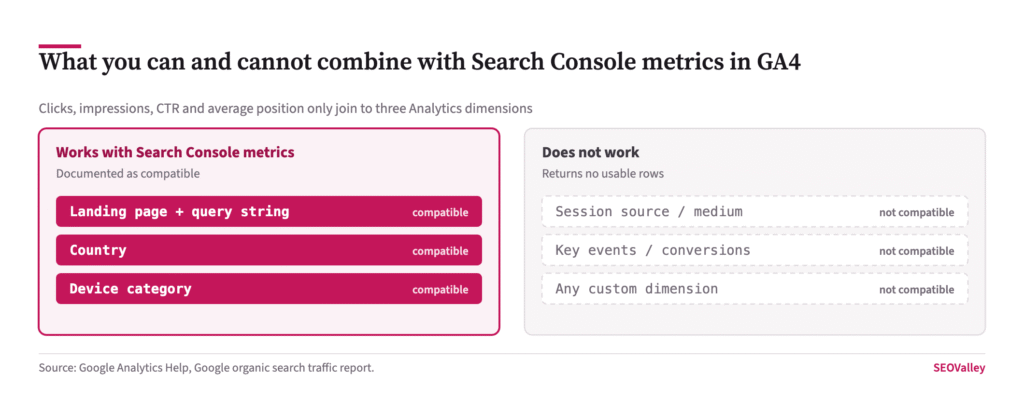
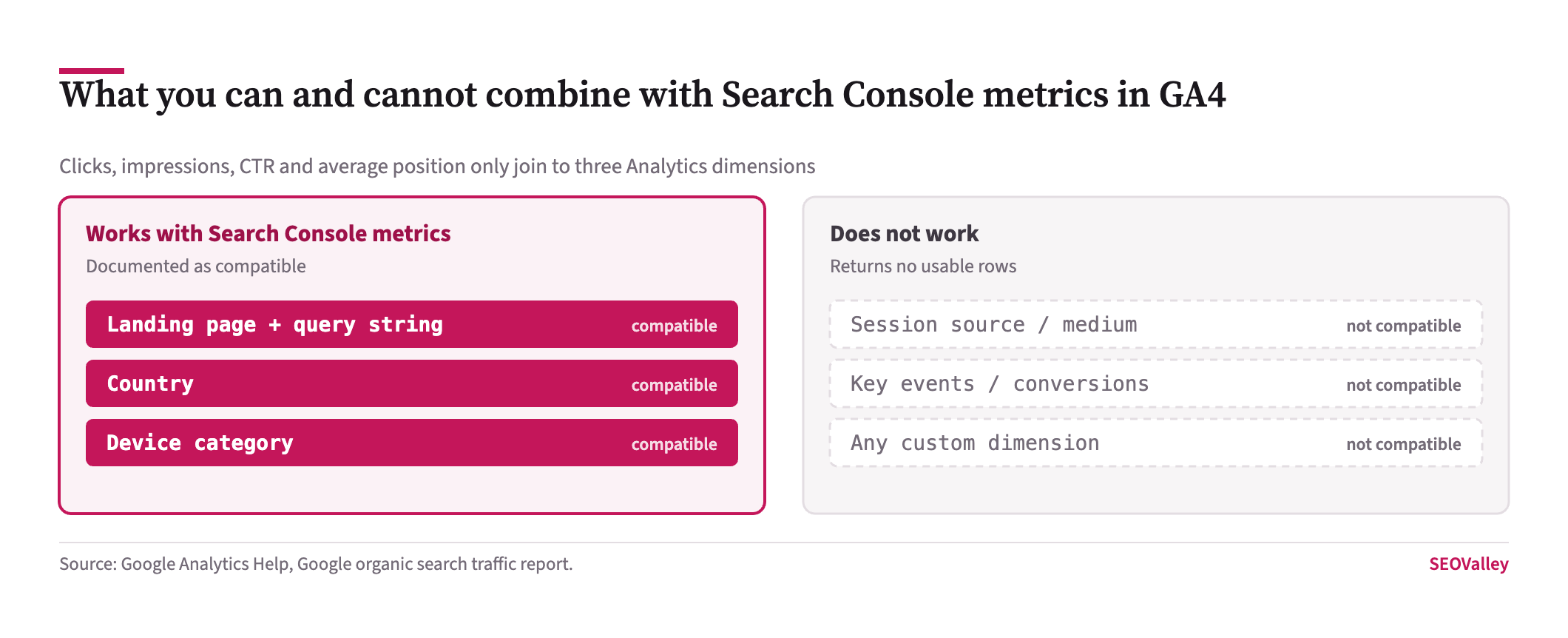
- Search Console metrics inside GA4 — clicks, impressions, click-through rate and average position — are compatible only with Search Console dimensions plus Landing page + query string, Country and Device category, per the Google organic search traffic report documentation.
- Search Console data appears in GA4 roughly 48 hours after Search Console collects it.
- Search Console retains 16 months of data, so GA4 reports built on it inherit the same 16-month ceiling.
- GA4 data retention defaults to 2 months for event data and can be raised to 14 months, with longer options only on GA4 360.
- The retention setting affects explorations and funnel reports, not standard aggregated reports, and increasing it applies retroactively to data not yet deleted.
- GA4 applies system-defined data thresholding that withholds rows to prevent identification of individual users; Google states these thresholds cannot be adjusted.
- Analytics does not export Google signals data to BigQuery, so event counts per user can differ between GA4 and BigQuery.
This article covers which GA4 reports answer an SEO question, where the data genuinely cannot be combined, why your numbers disagree with Search Console, and what to put in a monthly report that will hold up.
What does a correct GA4 setup look like for SEO?
Five things, and a property missing any of them will answer search questions badly no matter how the reports are built.
A single property with one web data stream per site, rather than a stream per subdomain, so organic sessions are not split across properties. Enhanced measurement left on, which captures scrolls, outbound clicks and site search without tagging work. The Search Console link established, without which the organic search reports do not exist at all. Key events marked for the actions that represent business outcomes. Data retention raised from the two-month default to fourteen months.
Why it matters: these are configuration decisions rather than reporting decisions, and each one is irreversible in the sense that it does not backfill. A property that was never linked to Search Console has no historical search data to recover once you link it.
The check: open Admin and walk the list — Data streams, Enhanced measurement, Product links, Events, Data retention. It takes five minutes and it is the first thing worth doing on any property you have inherited rather than built.
Why do GA4 sessions never match Search Console clicks?
Because they count different events, in different places, under different rules. Neither is wrong.
What it looks like: Search Console reports 10,000 clicks, GA4 reports 7,000 organic sessions, and someone concludes the tracking is broken.
Why it matters: Search Console counts a click on a result, server-side, before your page loads. GA4 counts a session, client-side, after your tag fires and after the visitor has answered your consent banner. Every visitor who bounces before the script runs, blocks trackers, or declines consent exists in one dataset and not the other.
The check: in GA4 open Reports, Acquisition, Traffic acquisition, and filter Session default channel group to Organic Search. Compare the trend line against Search Console clicks rather than the absolute figures. If both move together, your tracking is sound and the gap is structural. If they diverge, something changed in your tag or consent configuration.
Report the gap rather than hiding it. A consistent thirty per cent difference is a property of the measurement, and explaining it once is easier than being asked about it every month.
Which GA4 report actually answers an SEO question?
Three of them, and the rest are for other jobs.
Traffic acquisition tells you how much organic search brought and what those visitors did. Landing page tells you which entry pages carried it, which is the unit SEO work operates on. The Google organic search traffic report, available once Search Console is linked, puts clicks, impressions and average position beside engagement and key events for the same landing page.
The check: confirm the Search Console link exists before promising the third one. In GA4, open Admin, then Product links, then Search Console links. Without an active link the report is absent entirely, and no amount of exploration building will reproduce it.
Why does my Search Console report in GA4 come back empty?
Almost always because it has been combined with a dimension that is not compatible. The join is narrow and Google documents exactly how narrow.
Key data: Search Console metrics work with Search Console dimensions and only three Analytics dimensions — Landing page + query string, Country and Device category.
Why it matters: the obvious analyses are the ones that fail. Search Console clicks by session source, by key event, or by any custom dimension will not resolve, because the data is joined at the landing page rather than at the session.
The check: if an exploration returns no rows, remove every dimension except landing page and rebuild upward. The row that breaks it is the incompatible one. Where the analysis genuinely needs session-level joining, export both datasets and join them yourself on landing page rather than expecting GA4 to do it.
What do the reporting delays and retention limits mean in practice?
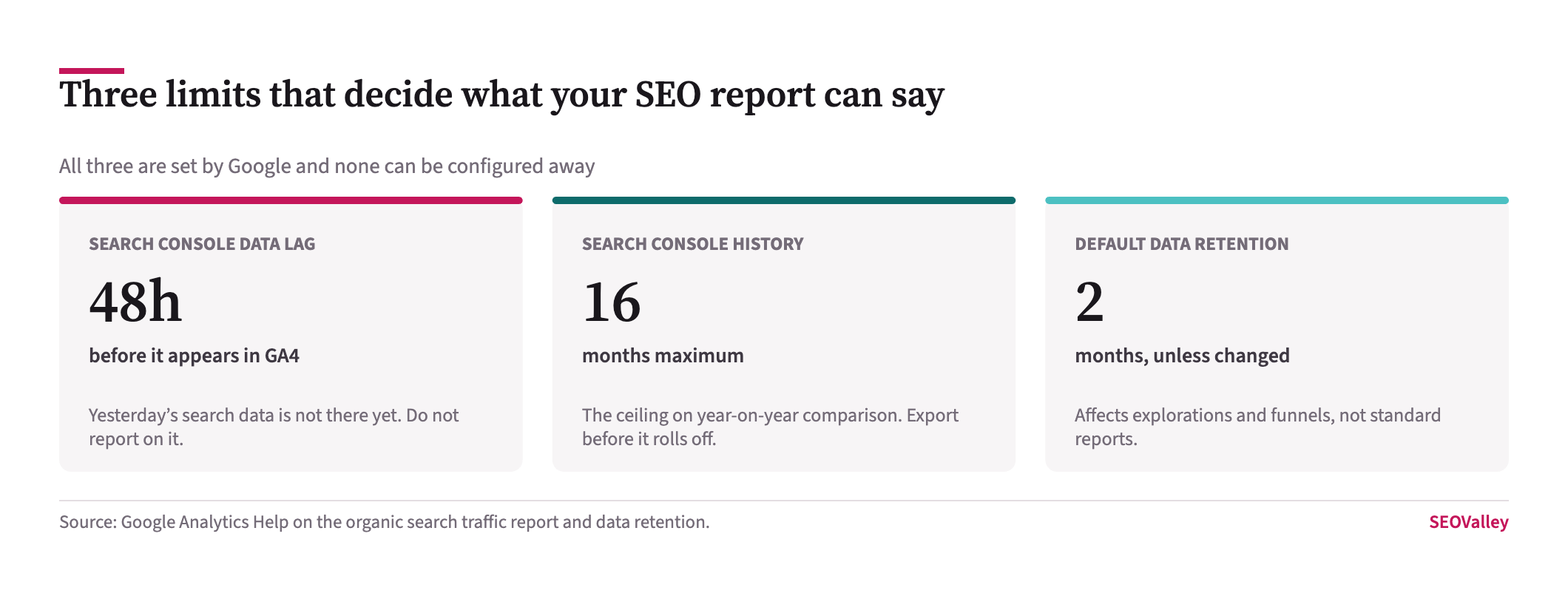
They decide what your report can say and how far back it can look.
Key data: Search Console data reaches GA4 about 48 hours after collection, Search Console holds 16 months, and GA4 event retention defaults to 2 months with 14 months available.
Why it matters: a report produced on the first of the month that includes the last two days of the previous month is reporting on incomplete search data. And a property left on the 2-month default cannot build a year-on-year exploration at all, because the data was deleted before anyone needed it.
The check: open Admin, Data collection and modification, Data retention. If it reads 2 months, change it to 14. The increase applies retroactively to data not already deleted, so doing it today preserves more than doing it next quarter. Note that retention governs explorations and funnels rather than standard reports, which is why the loss often goes unnoticed until someone tries a deeper analysis.
Why are rows missing from my reports?
Data thresholding, which is applied automatically and cannot be turned off. GA4 withholds rows so that nobody can infer the identity of an individual user.
Key data: thresholds are system-defined and, in Google’s words, cannot be adjusted. They commonly appear on reports containing demographic data or audiences built on demographics.
Why it matters: a report with thresholding applied is not a complete count, and totals will not reconcile with other views. Presenting a thresholded table as a full picture is an accuracy problem, not a formatting one.
The check: look for the data quality icon above the report, which states that thresholding has been applied. Widening the date range increases the aggregated volume and often releases the withheld rows. If you do not need demographics in an SEO report, remove them and the thresholding usually disappears with them.
Should SEO reporting still lead with sessions?
No, and this is the change worth making regardless of the tool. Sessions conflate how many people searched, how many clicked and how many were measured.
Lead with clicks from Search Console for search performance, because that number is server-side and consent-independent. Follow with key events from GA4 for what those visits produced. Keep sessions as a supporting figure rather than the headline, and label which system each number came from.
This matters more now that visibility inside AI features is reported as impressions with no clicks attached. A report structured around sessions has nowhere to put that, and will quietly omit it.
How do you track AI assistant referrals in GA4?
As referral traffic, since no assistant gives you a search console of its own.
The check: open Reports, Acquisition, Traffic acquisition, set the primary dimension to Session source / medium, and filter for chatgpt.com, perplexity.ai, gemini.google.com, copilot.microsoft.com and claude.ai. Add key events as a metric so the report answers a commercial question.
Why it matters: these referrals are often stripped of their referrer and land in direct traffic, so what you can see is a floor rather than a measurement. State that when you report it.
Is “Organic Search” in GA4 the same as Google?
No, and this catches people who report a single organic figure. GA4’s Organic Search channel group bundles every search engine it recognises — Bing, DuckDuckGo, Yahoo, Ecosia and others — alongside Google.
Why it matters: comparing that combined figure against Search Console, which covers Google alone, guarantees a mismatch that has nothing to do with tracking. It also hides the one trend worth watching, which is whether non-Google search is growing for you.
The check: in Traffic acquisition, switch the dimension from Session default channel group to Session source / medium. You will see google / organic separately from bing / organic and the rest. Compare only google / organic against Search Console, and report the others as their own line.
What should you export before you need it?
Search Console’s sixteen-month window rolls forward, which means month seventeen is gone and cannot be recovered from anywhere. Nothing in GA4 preserves it either, because the Search Console data in GA4 inherits the same limit.
Why it matters: the first serious question any new stakeholder asks is how performance compares to two or three years ago. If nobody exported, that question has no answer and never will.
The check: set a monthly reminder to export the Performance report at Queries, Pages and Dates granularity to a spreadsheet or a Looker Studio extract. Ten minutes a month buys you a history that Google does not keep for you, and it costs nothing to start this week.
What belongs in a monthly SEO report?
Six things, each attributed to the system it came from. Search Console clicks and impressions for the period, compared year on year rather than month on month so seasonality does not masquerade as performance. Average position for your tracked query set. Landing pages ranked by click change, which is where the work list comes from. Key events from GA4 for organic sessions. Indexed page count from the Indexing report. A dated list of what was shipped.
That last item is the one most reports omit and the one that makes the rest interpretable. Without deployment dates, every movement is a story rather than an attribution — the same problem that makes diagnosing a traffic drop take weeks instead of an afternoon.
Are your key events actually configured?
An SEO report without a conversion figure is a traffic report, and GA4 will not produce one until somebody marks an event as a key event. This is the step most often skipped during migration.
What it looks like: every report shows sessions and engagement rate, and nothing anywhere shows an enquiry, a sign-up or a sale.
Why it matters: without key events you cannot tell a page that attracts readers from a page that attracts customers, which means you cannot prioritise. Traffic ranked by volume sends effort to the wrong pages, and the gap only shows up when someone asks what the work earned.
The check: open Admin, then Events, and look at the Mark as key event column. Confirm the events that represent real business outcomes are switched on, then open Reports, Acquisition, Traffic acquisition and add those key events as a metric alongside organic sessions. If the column is empty, that is the first thing to fix, ahead of any reporting refinement.
What a monthly SEO report should contain
| Item | Source | Why it belongs there |
|---|---|---|
| Clicks and impressions, year on year | Search Console | Server-side and consent-independent; seasonality cannot masquerade as performance |
| Average position for tracked queries | Search Console | Separates a ranking loss from a result-page change |
| Landing pages by click change | Search Console | This is the work list; losses concentrate in few URLs |
| Key events from organic sessions | GA4 | Turns traffic into a commercial outcome |
| Indexed page count | Search Console | Catches indexation decay before it reaches rankings |
| Dated list of what shipped | Your deployment log | Without it every movement is a story rather than an attribution |
Symptom, cause and how to confirm it
| Symptom | Likely cause | How to confirm |
|---|---|---|
| GA4 organic sessions well below Search Console clicks | Client-side and consent losses — structural, not a fault | Compare the trend lines rather than the totals; a stable gap is normal |
| Search Console exploration returns no rows | An incompatible dimension in the report | Strip back to landing page only, then add dimensions one at a time |
| No Search Console data in GA4 at all | Property link missing | Admin, Product links, Search Console links |
| Cannot build a year-on-year exploration | Data retention left on the 2-month default | Admin, Data collection and modification, Data retention |
| Table totals do not reconcile | Data thresholding applied | Check the data quality icon above the report; widen the date range |
| Yesterday’s search data missing | The 48-hour Search Console lag | Shift the reporting window back two days |
What to set up this week
GA4 answers what happened after the click and Search Console answers what happened in search, and no amount of configuration makes either tool do the other’s job. The Search Console data inside GA4 joins only to landing page, country and device, arrives two days late and reaches back 16 months — build reports inside those limits and they will hold up.
The single next action is to open Admin, Data retention, and change 2 months to 14. It takes thirty seconds, it applies to data you have already collected, and without it next year’s year-on-year analysis is impossible no matter what anyone asks for.
What not to do: do not lead an SEO report with sessions, do not present a thresholded table as a complete count, and do not try to explain away the gap between clicks and sessions — explain it once and move on. If the reporting is meant to drive work rather than reassure, the output that matters is the landing-page table sorted by click change, which is also where an SEO audit should start, and what our blog marketing team uses to decide what gets refreshed next.
About the author
Shabir MS leads SEOValley Solutions and has worked in search since 2005. He has rebuilt client reporting through the move from Universal Analytics to GA4 and spends more time in Search Console exports than in dashboards. Read more from Shabir MS.
Frequently asked questions
Why do GA4 sessions not match Search Console clicks?
They measure different things. Search Console counts result clicks server-side; GA4 counts sessions client-side after your tag fires and consent is given, so it always records fewer.
Which GA4 dimensions work with Search Console metrics?
Only Search Console dimensions plus Landing page + query string, Country and Device category. Session source, key events and custom dimensions are not compatible.
How long does Search Console data take to appear in GA4?
About 48 hours after Search Console collects it. Reports covering the last two days will show incomplete search data.
How far back does Search Console data go in GA4?
Sixteen months, because that is Search Console’s own retention limit. GA4 reports built on that data inherit the same ceiling.
What is the GA4 default data retention setting?
Two months for event data, with 14 months available to all properties and longer options on GA4 360. Change it to 14 months.
Does changing data retention work retroactively?
Yes. Increasing the retention period applies to data already collected that has not yet been deleted, so making the change sooner preserves more.
Does data retention affect standard reports?
No. It affects explorations and funnel reports only. Standard aggregated reports are unaffected, which is why the loss often goes unnoticed.
Why are rows missing from my GA4 report?
Data thresholding. GA4 withholds rows to prevent identifying individual users. The thresholds are system-defined and cannot be adjusted.
How do I reduce data thresholding?
Widen the date range so more data aggregates, and remove demographic dimensions and audiences from the report if the analysis does not need them.
How do I see AI assistant traffic in GA4?
Reports, Acquisition, Traffic acquisition, with Session source / medium filtered to chatgpt.com, perplexity.ai, gemini.google.com, copilot.microsoft.com and claude.ai.
Why does BigQuery show different numbers to GA4?
Analytics does not export Google signals data to BigQuery, so event counts per user can legitimately differ between the two.
Should an SEO report lead with sessions?
No. Lead with Search Console clicks, which are server-side and consent-independent, then use GA4 key events for what those visits produced.